
Know where, when and how much to spend on Google Ads.
Stop paying for patients who would have found you anyway.
AdCompass checks where your practice already ranks on Google Maps and in search, across your whole area. Then it gives you three steps: what to stop paying for, where to advertise, and when to run it.
One payment per practice, every office included. No subscription, no Google Ads login needed.
Stop paying for 2 searches you already win. Spend $380 to $760 a month on 3 searches where you are hard to find. Push harder in July and August.
Pause “orthodontist near me”. You already win it.
Google Search and Maps, north of the office, $12 a day. Ready to paste.
Mon to Fri, when the phones are answered. More budget in July and August.
Most ad budgets ignore where you already rank for free.
The Google Ads dashboard knows what you spent. It does not know that you are already top 3 on the map for half your keywords. AdCompass starts from your rankings.
What not to pay for
Searches where you are already in Google’s top 3 on the map and in the results. Paying there buys clicks you would get anyway.
Which channel and area
Google Search, Google Maps or Local Services Ads for each search, aimed at the parts of town where you are invisible.
Hours and months
Ads only when your office can answer the phone, and more budget in the months people search most.
A daily budget
From search volume and cost per click in your city, so the number fits your market, not a national average.
What you get, section by section.
This is a real AdCompass plan, run for an imaginary practice so we can show every part of it. Yours looks the same, with your searches, your map and your city’s numbers.
Sample: Lakeside Orthodontics, McKinney, TX (made up)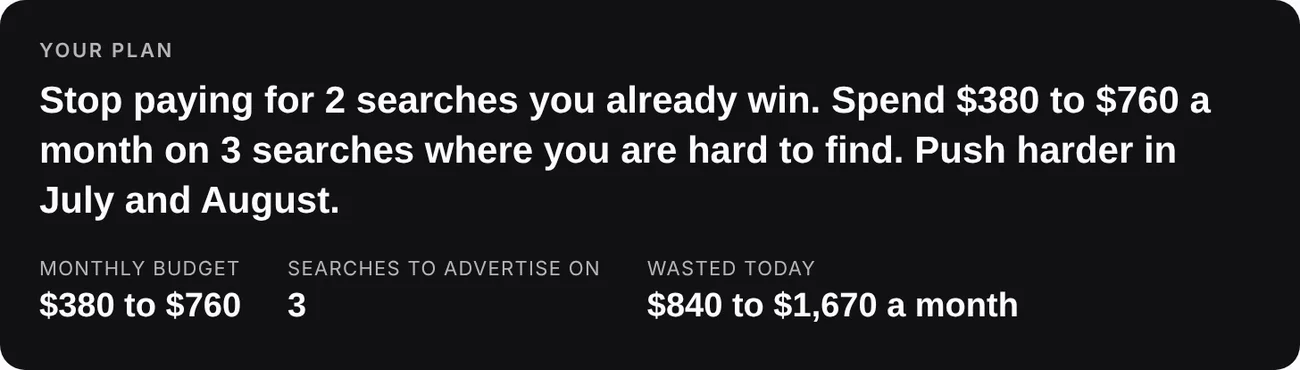
The answer first
One sentence tells you what to do. Under it, three numbers.
- Monthly budget: what the searches worth paying for should cost in your city.
- Searches to advertise on: how many made the cut.
- Wasted today: roughly what you spend on ads for searches you already win.
Step 1: Stop
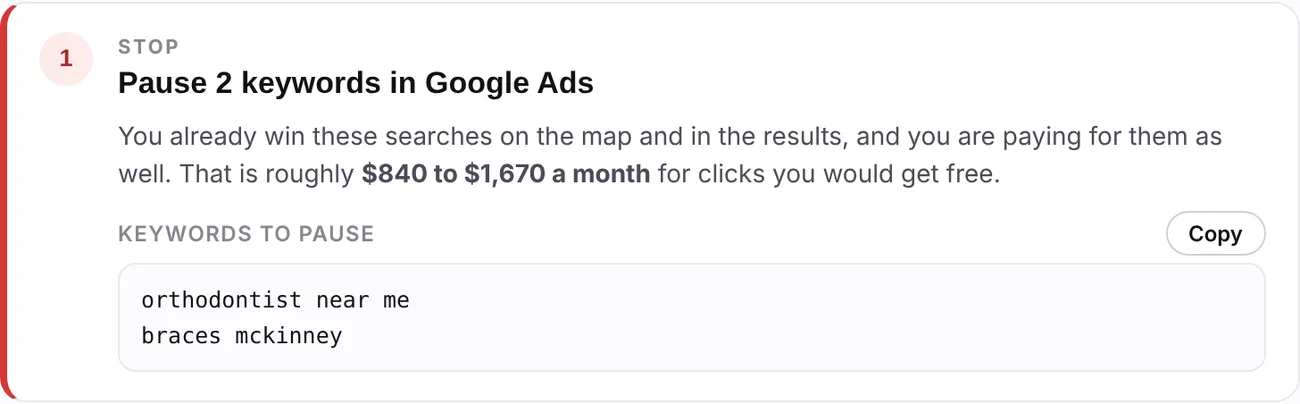
Lakeside is already in Google’s top 3 for “orthodontist near me” across its whole map, and first in the results for “braces mckinney”. It is still paying for ads on both.
- Those ad clicks would mostly have been free clicks on the listing.
- The list is ready to copy. Pause those keywords in Google Ads.
Do this: copy the list, find those keywords in Google Ads, click Pause.
Step 2: Start
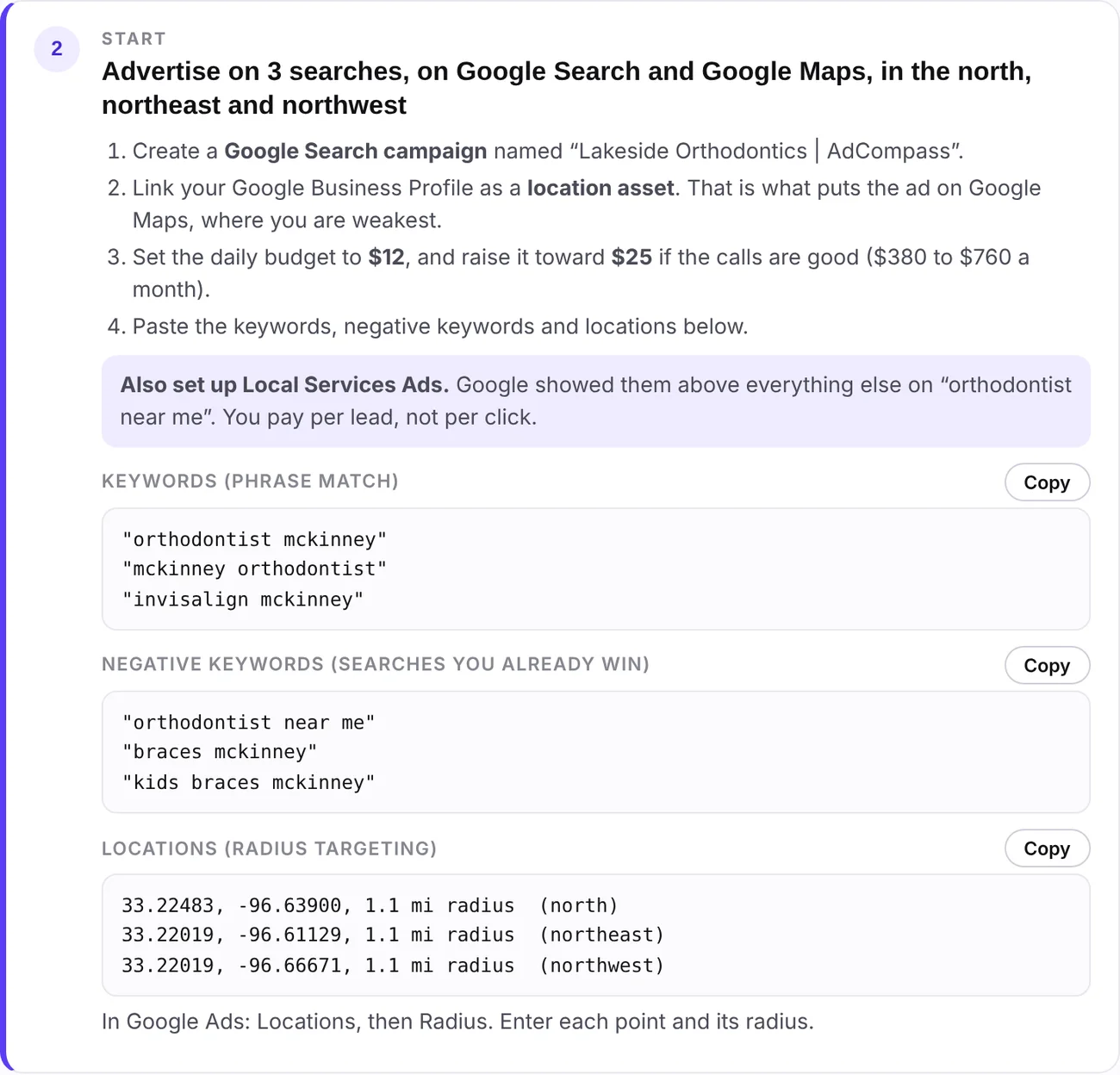
Where to advertise instead, and exactly how to set it up.
- Channel: Google Search, Google Maps, or both. Local Services Ads too when Google shows them for your searches.
- Daily budget: start at the low number, raise it when the calls are good.
- Keywords to advertise on, and negative keywords so you don’t pay for the searches you already win.
- Locations: the points and radius for the parts of town where you are hard to find, here north of the office.
Do this: each box has a Copy button. Paste them into a new Google Ads campaign.
Step 3: Schedule
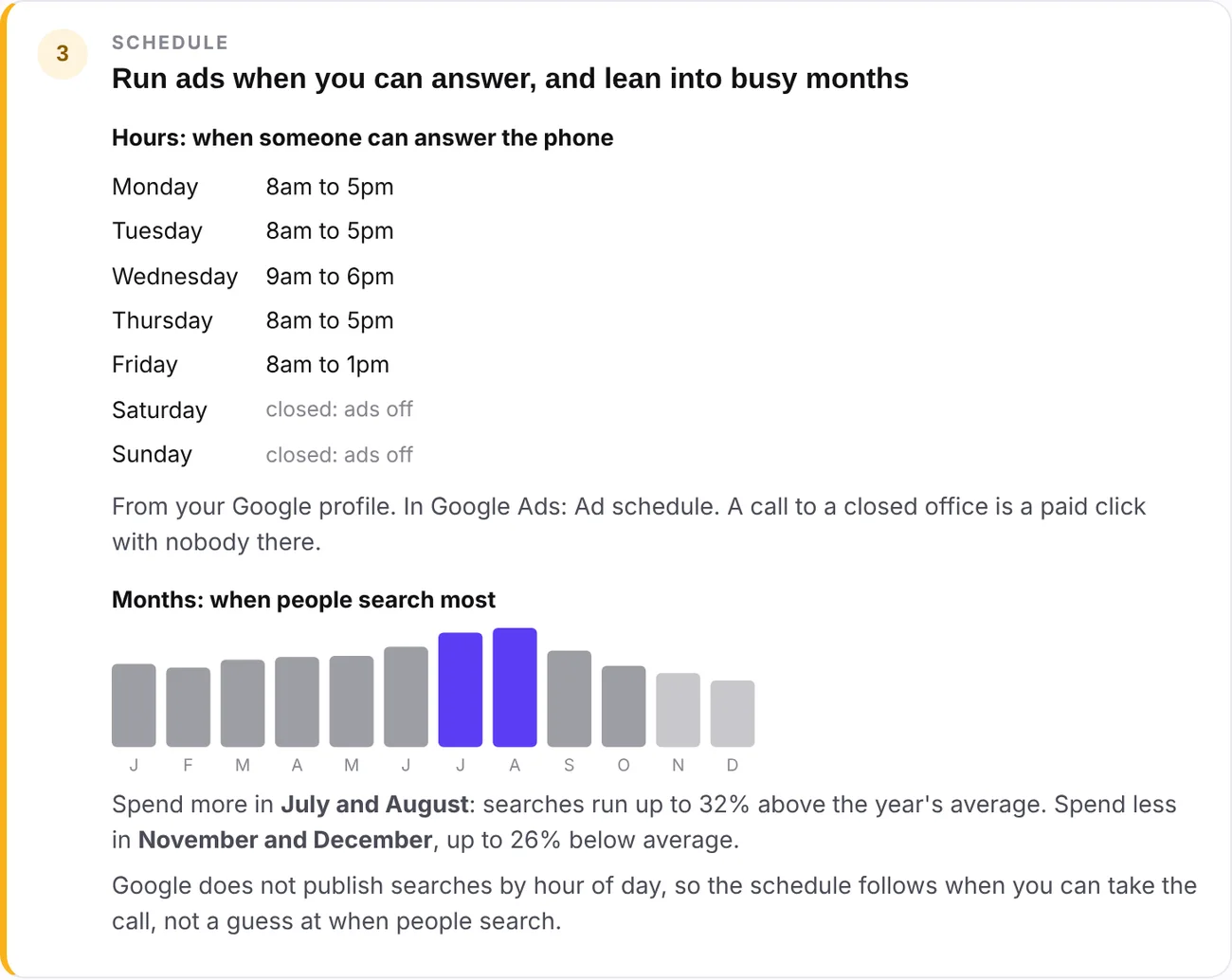
When to run the ads.
- Hours: taken from your Google profile. A call to a closed office is a paid click with nobody there.
- Months: twelve months of Google search data for your searches. Purple bars are the busy months, grey the quiet ones.
- Lakeside should spend more in July and August, when searches run about a third above average.
Do this: set the hours under Ad schedule in Google Ads. Put a reminder in your calendar to raise the budget before the busy months.
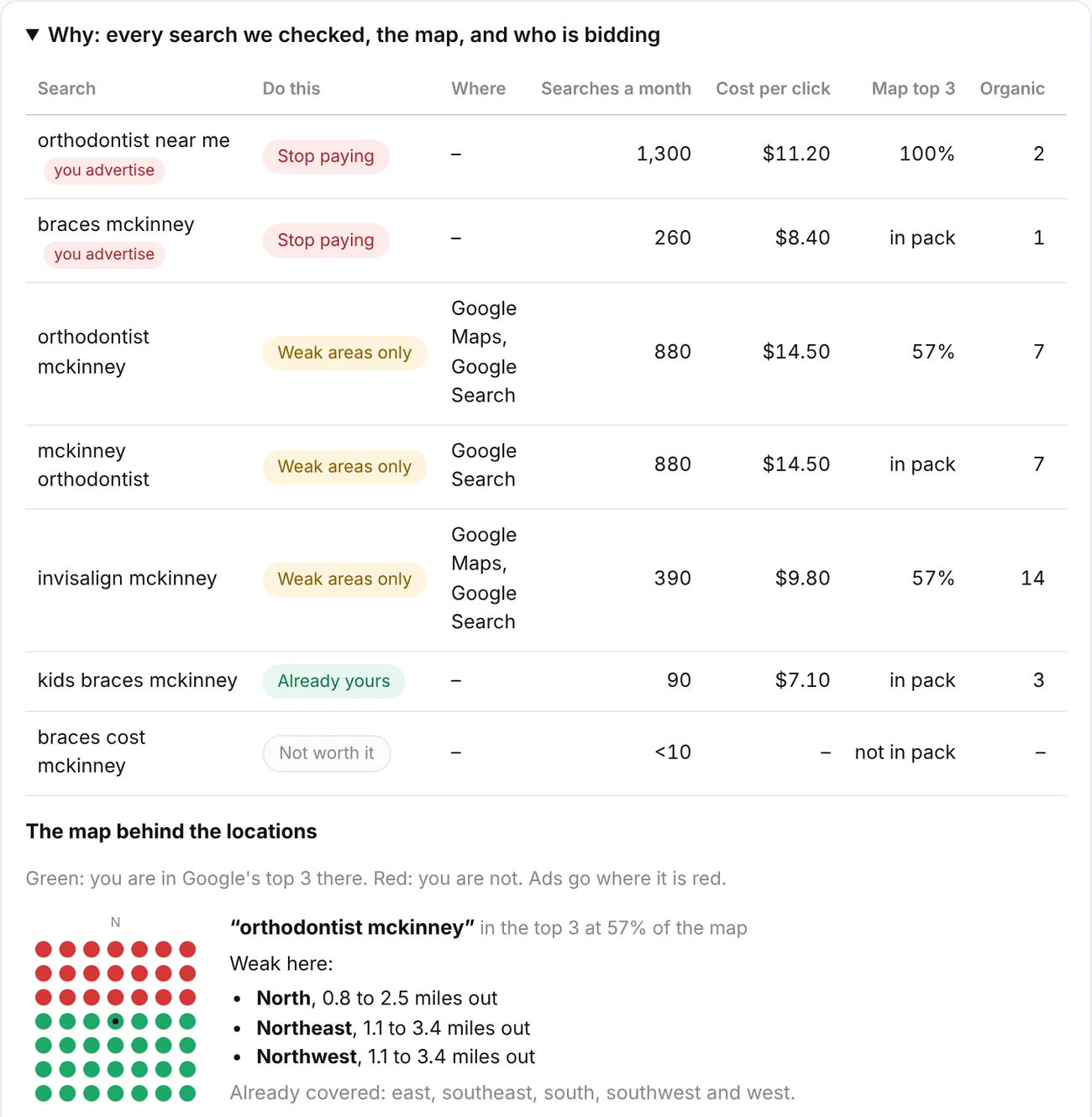
Why: the proof behind each step
Open it when you want to check the reasoning, or show it to your agency.
- Every search checked, with what to do, monthly searches and cost per click in your city.
- Map top 3: the share of your area where you show up in Google’s top 3 on the map.
- The map: green where you show up, red where you don’t. Ads go where it’s red.
- Who is bidding: the competitors running ads on your searches, and on your practice name.
Three minutes from now, you have a plan.
Find your practice
Enter your website and city. We match your Google listing.
Pay once
$30 for the practice. Every office is included.
Get the plan
Three steps, with keywords, negative keywords, locations and a schedule ready to paste into Google Ads.
One plan, one price.
Every office included. No subscription.
- What to stop paying for, and roughly what it saves
- Google Search, Maps or Local Services Ads, for each search
- Target areas ready for Google Ads radius targeting
- Ad hours from your Google profile, and your busiest months
- Daily budget from your city’s search volume and cost per click
- Who is bidding on your searches, and on your name
On the WGO SEO Tool monitoring plan? AdCompass is already included, refreshed with every report.
Good to know
Do I need to connect my Google Ads account?
No. The plan is built from public search results and Google’s own volume and cost-per-click figures for your city. That also means the budget is an estimate, worked out the same way every time and explained on the plan.
Can it tell me what time of day to advertise?
Google does not publish searches by hour, so nobody can honestly tell you that. AdCompass schedules your ads for the hours your office answers the phone, from your Google profile, and tells you which months to spend more and less in from twelve months of search data.
How is the budget worked out?
Monthly searches in your city, times the share of your area where you are not in Google’s top 3, times an assumed 5 to 10 clicks per 100 searches, times the cost per click. The assumption is printed on the plan.
Why would I stop advertising on a search?
If you are already in the top 3 on the map across most of your area and near the top of the results, most people who click your ad would have clicked your listing for free. That money is better spent where you are invisible.
Is the sample a real practice?
No. Lakeside Orthodontics is made up so we could show a full plan without sharing anyone’s numbers. The plan itself was produced by AdCompass, the same way yours will be.
Is this part of the WGO SEO Tool?
Yes. It is included in Practice SEO Monitoring, the $149 a month plan, and refreshed with every report. If you only want the ad plan, it is $30 per practice, one time.
Spend your ad money where it changes something.
$30, one time. Your plan is ready in a few minutes.